


My Stocks Portfolio
4.87.96K Reviews
App Specs
- Version
- 2.1123
- Updated On
- License
- Free
- Downloads
- 1,000,000+
- Developer
- Peeksoft: Stock Market & Investing
- Categories
- Finance
- Platform
- Android
Screenshots
 Analysis by AppCompare
My first useful moment with a portfolio tracker is not seeing a market chart; it is knowing what I own without having to search through old notes or remember which watchlist I used. My Stocks Portfolio is built around that practical job. It is a free finance app from Peeksoft: Stock Market & Investing, and its focus is keeping tabs on stocks, portfolios, crypto, and price alerts in one place. I would treat it as a companion for monitoring investments, not as a broker or a substitute for deciding what to buy.
If you are new to investing, that distinction is reassuring: the app can help you organize and observe holdings, while the actual investing decisions remain yours. Its 4.7 average from around 39,000 ratings and more than a million installs suggest it has found a sizeable audience, but popularity does not make every screen instantly obvious. My advice is to start with one small portfolio and learn the parts you actually need before exploring everything else.
What to expect from a portfolio tracker
A tracker is most useful when it answers a few recurring questions quickly: what am I following, how are my holdings moving, and is a price worth checking again? This app brings stock tracking, portfolio views, crypto monitoring, and price alerts into the same finance tool. That combination is handy if your interests cross those areas, though it also means the app can feel broader than a simple watchlist.
It is not the same experience as opening a brokerage app. A broker is where you handle transactions and account-specific tasks; a tracker is where you keep an eye on market information and organize what matters to you. I like that separation because it can make checking prices a deliberate habit rather than an excuse to trade. Still, I would verify important figures in the account or market source you rely on before acting, especially when timing matters.
The app is listed for Everyone and is free to download, with in-app purchases ranging from $2.99 to $149.99 per item. That makes it easy to try the basic experience before deciding whether any paid option is relevant to you. It first appeared on Jun 27, 2014, and its current version is 2.1073, with Android 7.0 as the stated minimum. Those details make it worth checking compatibility and purchase prompts on your own device before settling into a workflow.
Getting Started with My Stocks Portfolio
I’d use this section to set a calm first goal: make one small list of holdings or market names you genuinely want to follow, rather than trying to recreate your finances all at once. That gives you something concrete to check and makes it easier to notice whether the app’s portfolio view suits your routine. From there, the next step is choosing entries carefully so the information stays useful.
Make the first setup manageable
First off, setting up My Stocks Portfolio is as easy as pie. The interface is super intuitive, and I had my portfolio up and running in no time. You simply enter your stocks, and voilà, you’re ready to track them like a pro. I love how you can customize your portfolio to match exactly what you’ve got in real life. No more guessing or trying to remember what you invested in last month!
Worth Reading Before You Choose

EA SPORTS FC Mobile 26 Is a Bigger Football Game, but It Takes Time

Flipboard Shows What News Apps Must Do Beyond the Feed

Switching to Android Auto Means Rethinking Your Driving Routine

Google Calendar Makes a Crowded Week Easier to Manage

Ludo King Makes the Most of the Minutes Between Plans

Baby Panda World Brings Quick Play to Modern Phones, but Its Game Library Feels Busy
For a first pass, I would add only the holdings you genuinely want to monitor, rather than trying to reproduce every detail of your financial life at once. Before entering anything, gather the names or symbols you use to identify your investments and decide which holdings belong together. That little bit of preparation prevents a common beginner snag: adding something with a similar name and then wondering why the result does not match what you expected.
It is also useful to distinguish a holding you own from a stock you are merely watching. If you mix those up, the portfolio view can stop feeling like a clear account of your investments and start looking like a list of ideas. I would keep the first portfolio focused, then add a separate set of things to watch only if that helps answer a real question. A tidy starting point is more useful than a complete-looking screen that you do not trust.
Turn tracking into a useful routine
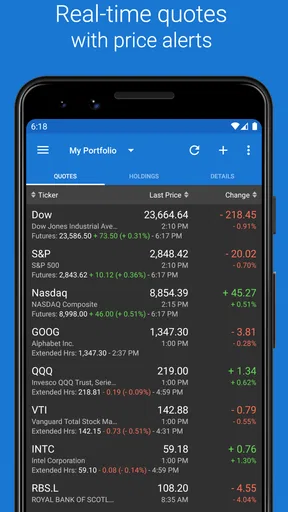
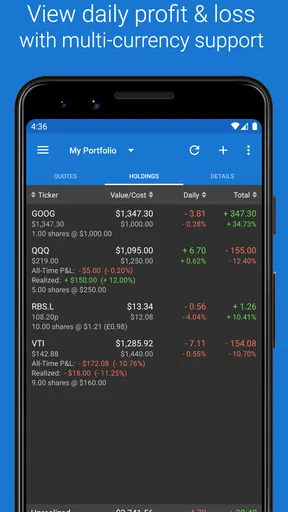
One of the standout features of this app is its real-time stock updates. I mean, who doesn’t love having the latest stock info at their fingertips? It’s like having a personal stock market analyst right in your pocket. Plus, the app supports multiple currencies, which is a massive bonus for those of us dabbling in international stocks. You can track your investments globally without breaking a sweat.
For an everyday example, imagine you are waiting for a meeting to start and want to check whether a company on your list has moved enough to deserve a closer look. A quick glance can help you decide whether to investigate later, rather than making a rushed choice in a few spare minutes. I find that kind of check-in more valuable than watching every small price change. Constant monitoring can make normal volatility feel like a personal emergency, particularly when you are still learning how markets behave.
Multiple currencies can also make a mixed-market watchlist easier to follow, but they do not remove the need to think about how you compare investments. If you are looking at holdings quoted in different currencies, decide whether you want to assess each one in its own market context or compare them in a common currency. That simple distinction helps avoid drawing conclusions from figures that are not directly comparable. For detailed tax or performance records, I would still keep the relevant statements and records from the institutions involved.
Set alerts without letting them set your agenda
Another neat feature is the alerts system. I set up alerts for when my stocks hit certain prices, and it’s been a game-changer. Now, I get a nudge whenever there’s a significant movement in my portfolio, so I never miss an opportunity to buy or sell. It’s like having a friend who always has your back in the stock market!
The most useful way to approach a price alert, in my view, is to decide what you will do when it arrives before you create it. An alert can prompt you to review a company, check the news, or compare the price with your own plan; it cannot tell you whether buying or selling is sensible. If every alert causes an impulsive trade, the feature is working against you. I would begin with a small number tied to decisions I have already thought through, then adjust if they create too much noise.
There is a practical trade-off here: alerts can save repeated manual checking, but too many thresholds can turn your phone into a stream of interruptions. A few carefully chosen levels are easier to act on than a dense grid of tiny price changes. I would also treat an alert as a prompt to verify the current situation, not as a guarantee that the price will stay there by the time I open the app.
Read the charts with a clear question
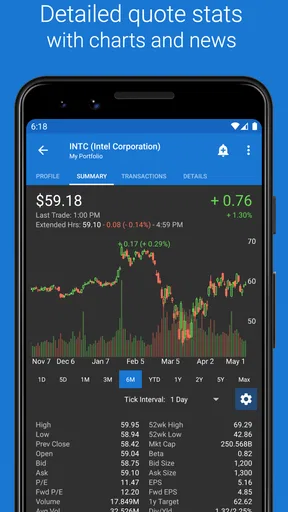
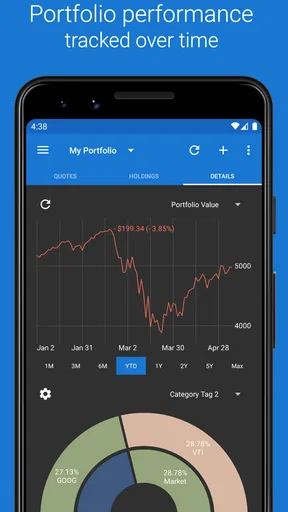
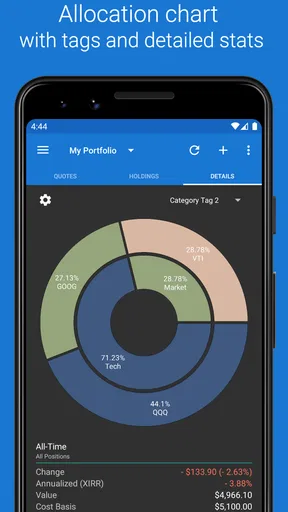
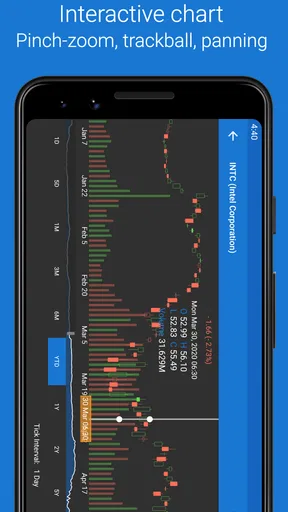
Let’s talk about analysis. The app offers some nifty tools to help you see how your investments are performing. I particularly enjoy the detailed charts and graphs that make it easy to understand trends and patterns. It’s like having a mini stock market report that’s tailored just for you. Seeing my portfolio’s performance over time has helped me make more informed decisions about where to invest next.
Charts are easiest to use when you bring a specific question to them. For example, you might want to see whether a holding has been unusually volatile lately, or whether a change you noticed is part of a longer movement. Looking at a chart without a question can encourage pattern-spotting where none is useful. I use visual summaries as a way to decide what deserves research, not as proof that a trend will continue.
Portfolio performance can also be misleading if the list is incomplete or its entries do not reflect what you intend to track. Before relying on a chart to compare holdings, check that the portfolio is organized consistently and that you are not mixing a real holding with a watchlist idea. This is one reason I would build the portfolio carefully at the start: the value of analysis depends on the quality of the information you choose to follow.
Where it fits—and where it does not
Compared with a basic watchlist, this app makes more sense if you want a broader view that includes portfolios, crypto, and alerts rather than only a handful of stock prices. Compared with a brokerage app, it is better thought of as a monitoring and organization layer than as the place to manage trades. That distinction may suit someone who uses more than one financial provider, or who wants a separate screen for watching markets without opening an account interface.
It may not be the right choice if what you need most is a simple, transaction-focused tool inside your broker, or if you want investment recommendations rather than tracking. People who prefer to check only an occasional headline and do not maintain a watchlist may find a dedicated tracker unnecessary. And if a crowded feature set puts you off, a simpler list in a tool you already use could be easier to maintain. The right choice depends less on how many options an app offers and more on whether you will keep its information organized.
Crypto monitoring can be convenient alongside stock tracking, but it does not make those assets behave alike or remove the different risks involved. I would use the shared view for awareness, not as a reason to compare every movement as if it came from the same kind of investment. Keeping a clear mental separation between asset types makes the combined screen more useful and less likely to invite a rushed, apples-to-oranges decision.
Things to Keep in Mind
Now, while I’m all praises for My Stocks Portfolio, it’s worth mentioning that the app is quite feature-rich, which might feel overwhelming at first. But trust me, after a few uses, you’ll find your footing, and it’ll become second nature. Also, make sure to keep your app updated to enjoy the latest features and improvements. Nothing like a fresh coat of paint to keep things running smoothly!
For a first-time user, the easiest way through that initial complexity is to give yourself a narrow goal: add a few items, check that the portfolio makes sense, and set one alert only if you already know what you want it to remind you about. You do not have to explore every chart or setting on day one. If a label or view is unclear, pause and check what you entered before assuming the app has interpreted your portfolio the way you intended.
Price information is useful for monitoring, but it is not a complete account of why a security moved or what you should do next. The app can help you notice a change; understanding that change may require research beyond the chart. That boundary matters most for newcomers, because a clean interface can make market information feel more conclusive than it really is. I would use the app to stay organized and curious, while keeping decisions grounded in a broader view.
Who I would recommend it to
I would recommend it to someone who wants a dedicated place to follow several stocks, keep an eye on a portfolio, or include crypto and alerts in the same routine. It is particularly useful if you like checking your investments briefly during the day but do not want that check to depend on opening a trading account. The ability to organize what you follow and revisit charts gives a curious beginner a path from simply noticing prices to asking more informed questions.
I would be more cautious about recommending it to someone who is uncomfortable maintaining a list or who expects a tracker to calculate every part of their personal finances. A portfolio view is only as helpful as the entries and habits behind it, and monitoring is not the same as record-keeping for every financial purpose. If you already have a reliable system that answers your questions with less effort, switching may add work rather than clarity.
Why I Love This App
In a nutshell, this app has taken the headache out of stock tracking for me. It’s reliable, easy to use, and packed with features that actually make a difference. Whether I’m at home or on the go, I know exactly how my investments are doing, and that’s a pretty liberating feeling. If you’re on the hunt for a solid portfolio tracker, give My Stocks Portfolio a try. It might just be the app you didn’t know you needed!
So, if you’re ready to take control of your investments and want a handy tool to help you along the way, head over to your app store and download My Stocks Portfolio today. Happy investing!
Pros
- User-friendly interface for easy navigation.
- Real-time stock updates and alerts.
- Customizable portfolio tracking.
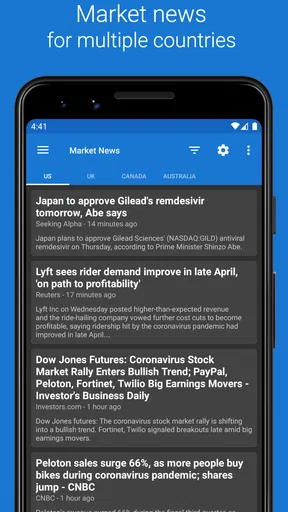
- Comprehensive financial news integration.
- Supports multiple global stock exchanges.
Cons
- Limited free version features.
- Occasional sync issues with brokerage accounts.
- No cryptocurrency tracking.
- Ads in the free version can be intrusive.
- Limited technical indicators for analysis.
FAQs for My Stocks Portfolio
What features does My Stocks Portfolio offer for tracking investments?
My Stocks Portfolio provides a comprehensive suite of features for investment tracking, including real-time quotes, detailed portfolio analysis, and performance charts. Users can easily monitor their stock and mutual fund holdings, view dividend and earnings reports, and receive alerts. The app also supports tracking of multiple portfolios, making it ideal for investors with diverse holdings.
Is My Stocks Portfolio suitable for beginners in stock investing?
Yes, My Stocks Portfolio is user-friendly and suitable for beginners. The app offers an intuitive interface with easy-to-understand charts and reports. It also provides educational resources and tips to help new investors understand the basics of stock investing, making it a great starting point for those new to managing their portfolios.
Does My Stocks Portfolio support international stock markets?
My Stocks Portfolio supports a wide range of international stock markets, allowing users to track investments globally. It provides access to data from major exchanges worldwide, enabling users to diversify their investments and stay informed about global market trends. This feature is particularly beneficial for those interested in international trading.
Are there any subscription fees or in-app purchases in My Stocks Portfolio?
My Stocks Portfolio offers a free version with essential features for basic investment tracking. However, it also provides a premium subscription that unlocks advanced features such as ad-free usage, enhanced charting tools, and priority customer support. Users can choose the option that best fits their needs and budget.
How secure is My Stocks Portfolio in handling my financial data?
Security is a top priority for My Stocks Portfolio. The app employs robust encryption protocols to protect user data and ensure privacy. It does not require sensitive information such as bank account details, focusing solely on investment data. Additionally, users can enable authentication features like PIN protection to further safeguard their portfolios.


